The MarketMan alternative for independent kitchens
Kitchen Manager Pro covers MarketMan's core workflow — AI invoice scanning, supplier orders, price alerts, variance and menu profitability — for a single independent kitchen at roughly a quarter of the price, by replacing integrations with photos. This page lays out the differences factually, including where MarketMan is the better choice.
All MarketMan figures verified against its public pricing page and help center on 4 July 2026. MarketMan is a trademark of its owner; Kitchen Manager Pro is not affiliated with it. If anything here is out of date, email rafael@kitchenmanagerpro.com and it will be corrected.
Choose MarketMan if…
You run multiple locations or a commissary, need live POS integrations, vendor EDI ordering, accounting sync (QuickBooks, Xero, Sage) or staff roles and permissions — and have the budget and onboarding time that comes with them.
Choose Kitchen Manager Pro if…
You run one independent kitchen and want invoice scanning, supplier orders, price alerts, variance and menu profitability at $59/month — set up in an afternoon, no contract, no integrations to maintain.
Pricing, side by side
| Kitchen Manager Pro | MarketMan | |
|---|---|---|
| Monthly price | $59 flat · $79 with Stock Counter | $199 (Starter) – $249 (Growth) per location |
| Setup / onboarding fee | None | $1,500 (waived in a current July 2026 promotion) |
| Contract | Month to month, cancel anytime | 12 months, 60-day cancellation notice |
| Trial | 14-day self-serve trial, no credit card | Demo call with sales |
| Invoice scanning | Unlimited, included | 50 scans/month on Starter, +$50 per extra 50 |
| Vendor EDI ordering | Not offered — orders go by WhatsApp, included | +$25 per vendor |
| First-year cost, one location | $708 ($59 × 12) | ~$3,888–4,488 + add-ons |
Prices as of 4 July 2026, per MarketMan's public pricing page; contract terms from the Meal Ticket help center.
Features, feature by feature
| Kitchen Manager Pro | MarketMan | |
|---|---|---|
| AI invoice scanning → inventory | ✓ Unlimited | ✓ (capped by plan) |
| Recipe costing / digital cookbook | ✓ With per-recipe tax & target margin | ✓ |
| Suppliers & purchase orders | ✓ Sent by WhatsApp, received into stock | ✓ EDI & vendor catalog |
| Price alerts & cost history | ✓ | ✓ |
| Sales data | Photo of the Z-report — works with any POS | POS integration required |
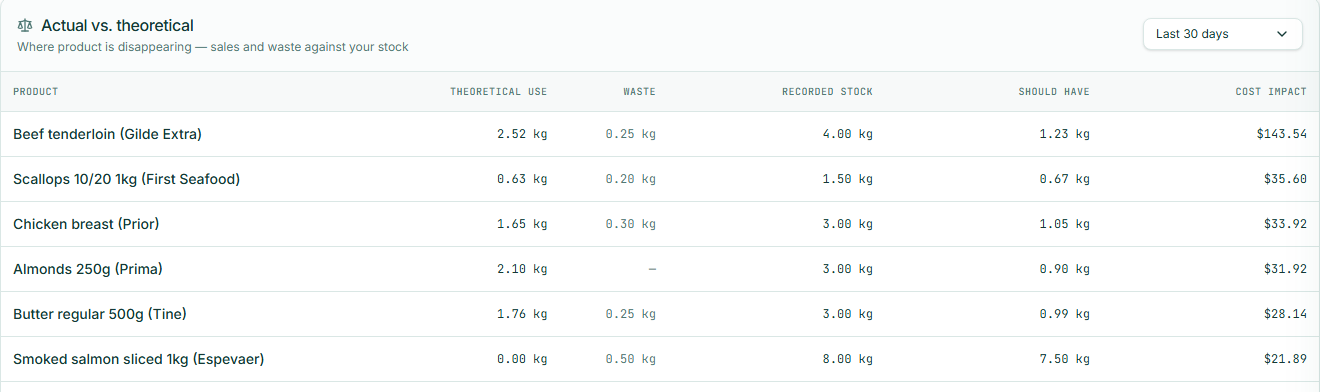
| Variance (actual vs. theoretical) | ✓ | ✓ |
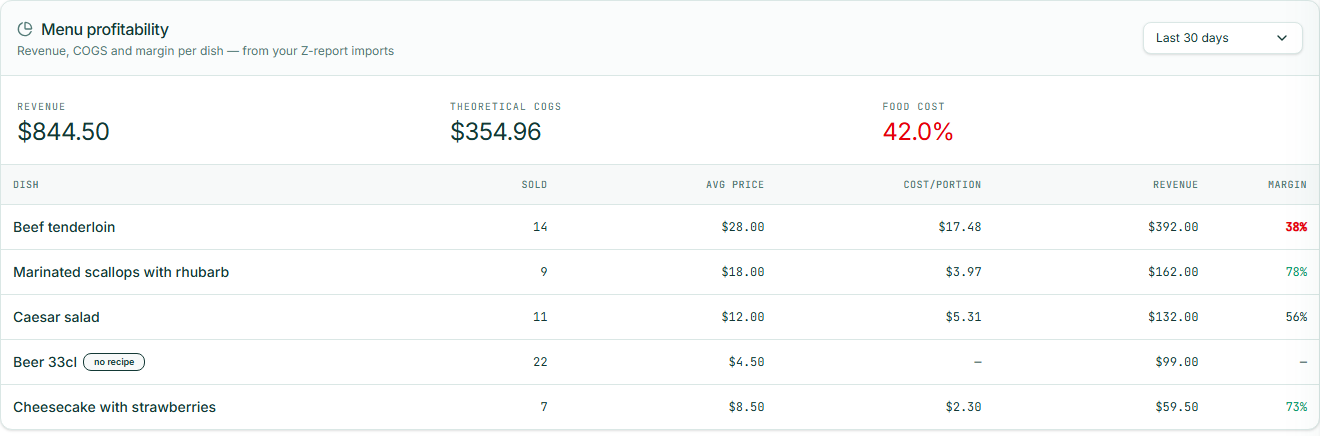
| Menu profitability | ✓ | ✓ |
| Waste log | ✓ Five-second mobile flow | ✓ |
| Mobile stock counting | ✓ Offline-capable, label scanning | ✓ Mobile app |
| Events & catering with allergen-conflict warnings Only in KMP | ✓ EU 14-allergen tracking built in | — |
| AI kitchen assistant (voice & chat) | ✓ | — |
| POS integrations (two-way) | — By design: the Z-photo replaces them | ✓ Large catalog |
| Accounting sync (QuickBooks, Xero, Sage) | — Export PDF/CSV | ✓ |
| Multi-location / HQ / commissary | — Built for a single kitchen | ✓ |
| Staff roles & permissions | — One account per kitchen | ✓ |
| Languages | English, Spanish, Norwegian, Portuguese — natively written | English-first, machine-translated locales |
The philosophical difference: integrations vs. photos
MarketMan's model assumes your systems talk to each other: POS integration for sales, EDI for vendors, accounting sync for the books. That's genuinely powerful for a group — and it's why onboarding takes weeks and the price is what it is.
Kitchen Manager Pro assumes something simpler: every number your kitchen produces already exists on paper. Supplier invoices, price lists, the Z-report your POS prints at close. So you photograph them. The AI reads every line, you review it, and your recipe costs, stock, variance and margins update — with nothing to integrate, configure or break.
Before you sign: what reviewers flag
To be fair: MarketMan's feature reviews on G2 and Capterra are broadly positive. The recurring complaints in public reviews are about the commercial experience around the product — and since the plan is a 12-month commitment, they are worth checking before you sign. Whichever tool you choose, ask about these five.
- The contract, and getting out of it. The most intense complaints on Trustpilot are about cancellation: the 12-month lock-in with 60-day notice, weeks of back-and-forth emails to close an account, and reviewers reporting they were billed for months after they had stopped using the platform. Ask before signing: "Walk me through the exact cancellation process — and what do I owe if I stop using it in month three?" Kitchen Manager Pro is month to month; cancelling is a button in the app.
- Real onboarding time. The pitch is 2–4 weeks; reviewers commonly report six to twelve, with recipe setup, vendor data migration and POS-integration troubleshooting taking the longest. Some describe the initial data entry as tedious and largely on their shoulders. Ask before signing: "What exactly does the $1,500 onboarding include, and what happens if it runs long?" Kitchen Manager Pro has no onboarding project: photograph your price lists and you are costing recipes the same afternoon.
- Invoice scanning in practice. Reviews are mixed on reliability — one G2 reviewer wrote that scanning "did not work 50% of the time" with support taking days to respond. Starter also caps you at 50 scans a month, then charges $50 per extra 50. Ask before signing: "What happens when a scan fails — who fixes it, and how fast?" Kitchen Manager Pro scans are unlimited, and you review every extracted line on screen before it touches your data.
- The mobile app during counts. Reviewers report the app crashing mid-count and losing work, and struggling exactly where counting happens: walk-ins, basements and storage rooms with weak Wi-Fi. Ask before signing: "Does counting work fully offline, and does it autosave every entry?" Kitchen Manager Pro's stock counting is offline-capable and built for the walk-in, with label scanning.
- What the invoice actually says. The sticker is $199–249; the first year with setup and typical add-ons (extra scans, $25 per EDI vendor, commissary) lands closer to $4,000 — and some reviewers report billing arriving from unfamiliar third-party domains. Ask before signing: "With my vendor count and invoice volume, what will my actual monthly bill be?" Kitchen Manager Pro is $59 flat, everything included — the number on this page is the number on the invoice.
Complaint themes from public reviews on Trustpilot, G2 and Capterra, read on 4 July 2026. Individual experiences vary — read the reviews yourself before deciding.
What switching looks like
- Day one, afternoon: photograph your supplier price lists and a stack of invoices. The AI builds your ingredient database with prices and pack sizes.
- Day one, evening: photograph tonight's Z-report. Sales are matched to your recipes; your food cost % exists by close.
- Rest of the trial: add recipes as you cook, log waste in five seconds, send your first WhatsApp purchase order. Fourteen days, no credit card, all data exportable.
Common questions
As of July 2026: $199/month (Starter) to $249/month (Growth) per location, plus a $1,500 onboarding fee (waived in a promotion running as of 4 July 2026). Add-ons include extra invoice scans ($50 per additional 50 on Starter), vendor EDI ($25 per vendor) and commissary ($50 per location). Plans run on 12-month contracts with a 60-day cancellation notice.
Kitchen Manager Pro covers the same core workflow — AI invoice scanning, supplier purchase orders, price alerts, sales tracking, variance and menu profitability — for $59/month flat, with no setup fee and no contract. It skips multi-location tools, POS integrations and accounting sync on purpose: sales come from a photo of your Z-report instead.
No — and that's deliberate. Instead of maintaining POS integrations, you photograph the daily Z-report and the AI reads the dishes sold, matches them to your recipes and feeds the variance and profitability reports. It works with any POS that can print a closing report, and there is nothing to connect or break.
Feature reviews on G2 and Capterra are broadly positive. The recurring complaints in public reviews — Trustpilot especially — concern the commercial experience: cancellation friction on the 12-month contract, onboarding commonly taking six to twelve weeks against the 2–4 pitched, invoice-scan reliability, the mobile app losing inventory counts where Wi-Fi is weak, and add-ons pushing the real bill above the sticker price. Verify those five points before signing — they are the reason Kitchen Manager Pro is month to month with a self-serve trial.
If you run multiple locations with a central kitchen, need live two-way POS integrations, vendor EDI ordering, accounting sync (QuickBooks, Xero, Sage) or staff roles and permissions, MarketMan is built for that and Kitchen Manager Pro is not. For a single independent kitchen, you'd be paying enterprise prices for machinery you don't use.
An afternoon. Photograph your supplier price lists and invoices — the AI builds your ingredient database with prices. There are no onboarding calls or implementation weeks, and the 14-day trial needs no credit card.
Keep the features.
Lose the contract.
Start free. Import your first price list in under a minute — and see your food cost % by tonight.
Start Free Trial